Integrating with Epic #
Epics Offers and Game Store #
You can map a Pragma offer to any type of Epic Offer.
Start by checking out the Epic Offers docs.
Plugin configuration #
All Epic configuration values can be found under Product Settings in the Epic developer portal.
You will need to reach out to Epic to get your client access to the ECOM web APIs.
- Open a private support ticket.
- Provide your client id and ask that its policy allow the V1 ECOM web APIs.
social:
  shared:
    configs:
      Epic:
        class: "pragma.shared.EpicCredentialsConfig"
        config:
          clientId: "[client-id]"
          clientSecret: "[encrypted-client-secret]" # encrypted value
          deploymentId: "[deployment-id]"
          sandboxId: "[sandbox-id]"
  pluginConfigs:
    AccountService.identityProviderPlugins:
      plugins:
        Epic:
          class: "pragma.account.EpicIdentityProviderPlugin"
          config:
            sharedConfigKey: "Epic"
            playerLoginEnabled: true
            showPortalLoginButton: true
            accountLinkingEnabled: true
            accountLinkingCooldownInDays: 30
    ThirdPartyNodeService.orderProviderPlugins:
      plugins:
        Epic:
          class: "pragma.order.EpicOrderProviderPlugin"
          config:
            sharedConfigKey: "Epic"
Any configuration set through the portal will override any values assigned in a config yml file.
- Do not manually encrypt any secrets. The API automatically encrypts all sensitive values during submission.
- You only need to enter credential values in one form. Portal will store credentials under shared config.
Order provider configuration #
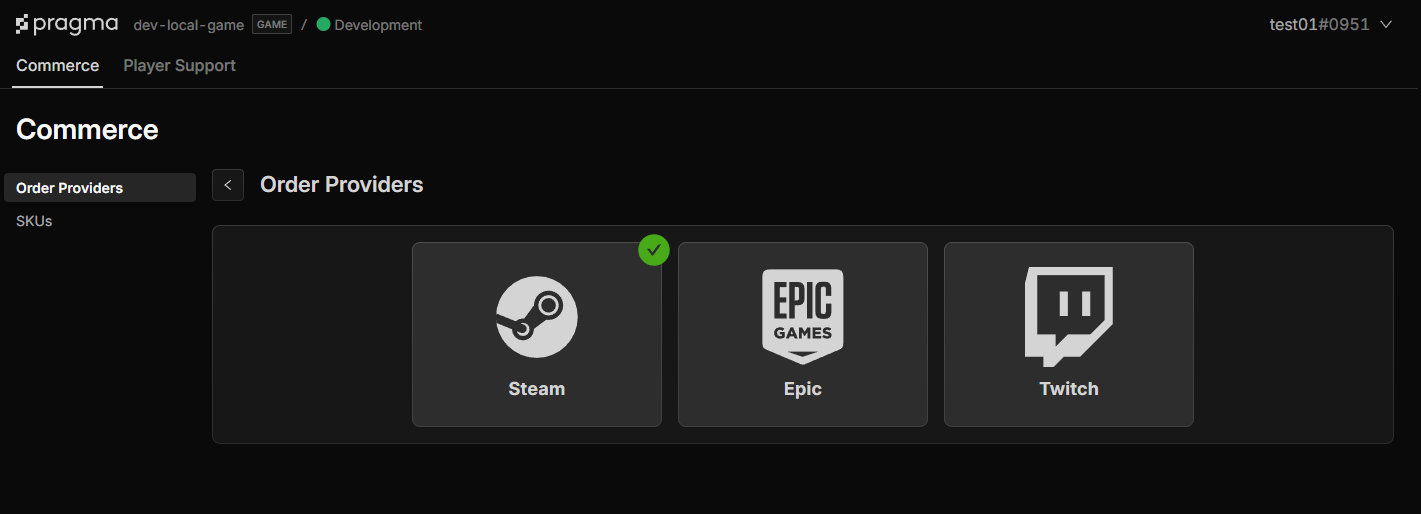
- Navigate to the Order Providers page: select the
CommerceTab →Order Providersin side menu. - Select platform to configure and fill out the form.
- Click
Confirmto see changes. - Click
Deployto apply changes.
Id provider configuration #
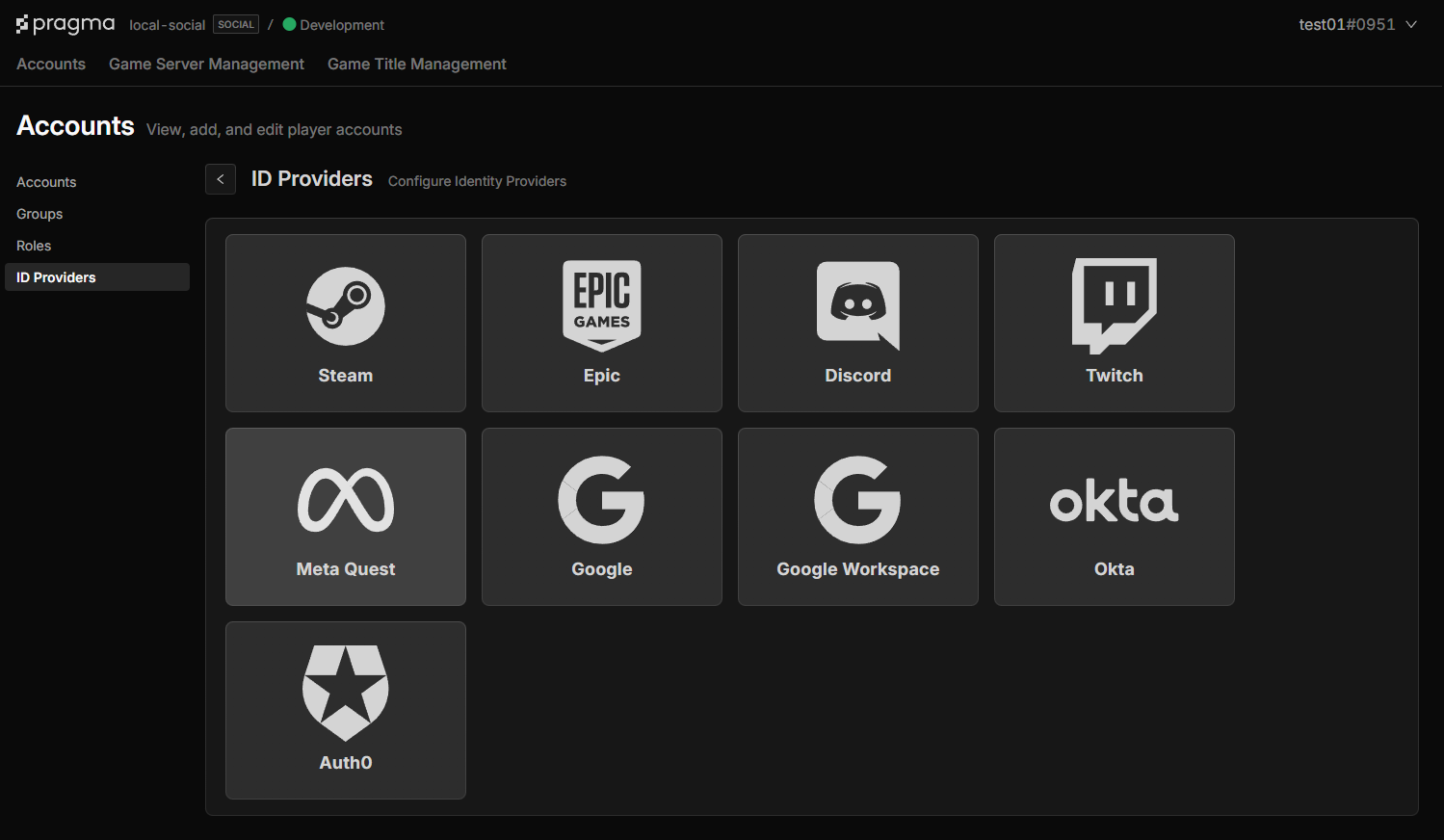
- Navigate to the ID Provider page: select the
AccountsTab →ID Providerin the side menu. - Select a provider and fill out the form.
- Click
Confirmto see changes. - Click
Deployto apply changes.
Order mapping example #
The content format depends on the Offer type assigned in Epic.
Ownership source
If the offer is of type: Game, Edition, Demo, Add-on, Season pass, or Digital extra, use the ownership source schema.
[project]/content/src/OrderMappingsSpecs.json
{
    "skuId": "SmallGoldBundle",
    "sources": [
        {
            "provider" : "EPIC",
            "epicSource" : {
                "ownership" : {
                    "audienceItemId" : "[offer-audience-item-id]"
                }
            }
        }
    ]
}
Entitlement source
If the offer type is: Consumable, use the entitlement source schema.
[project]/content/src/OrderMappingsSpecs.json
{
    "skuId": "SmallGoldBundle",
    "sources": [
        {
            "provider" : "EPIC",
            "epicSource" : {
                "entitlement" : {
                    "audienceItemId" : "[consumable-offer-audience-item-id]"
                }
            }
        }
    ]
}
Run the content apply command to validate and generate content catalogs.
./pragma content apply
Testing #
Link an Epic account to a Unsafe account using the player portal #
- This lets you authenticate and call the fulfill orders API through a unsafe account vs having to login with an Epic account.
- You can use the Postman collection for this flow.
Grant offers using Epics Access Keys #
- Epic does not provide a sandbox or dev flow for testing offer purchases.
- Instead you can generate Access Keys use those to grant an account various offers.
- Access token are scoped to a specific sandbox. The sandbox assigned must match the sandbox configured.
- Don’t generate a large amount, Epic will flag the request for manual review before tokens are available.
- Epic Access Key docs.
Refunds and charge backs #
You can turn on clawbacks through the pragma.order.EpicOrderProviderPlugin.
This will turn on a background poll that will call Epic to get any offers that should be revoked.
Example config with clawbacks enabled
social:
  shared:
    configs:
      Epic:
        class: "pragma.shared.EpicCredentialsConfig"
        config:
          clientId: "[client-id]"
          clientSecret: "[client-secret]"
          deploymentId: "[deployment-id]"
          sandboxId: "[sandbox-id]"
  pluginConfigs:
    ThirdPartyNodeService.orderProviderPlugins:
      plugins:
        Epic:
          class: "pragma.order.EpicOrderProviderPlugin"
          config:
            sharedConfigKey: "Epic"
            clawbackPollIntervalHours: 12
            clawbackPollingEnabled: true
            maxDaysWorthOfClawbacksToProcess: 10 # required - minimum is 1
%22/%3E%3Cpath%20d=%22M82%20113.698c1.821%201.063%201.834%202.78.0%203.843l-13.084%207.687a7.17%207.17.0%2001-3.284.798%207.17%207.17.0%2001-3.284-.798l-13.16-7.687c-1.821-1.063-1.834-2.78.0-3.843l13.084-7.687a7.168%207.168.0%20016.568.0L82%20113.698z%22%20fill=%22url(%23b)%22/%3E%3Cpath%20d=%22M73.16%20114.658a.985.985.0%2001.487.368%201.037%201.037.0%20010%201.186.981.981.0%2001-.486.369l-6.383%203.846a3.438%203.438.0%2001-3.198.0l-6.42-3.846a.982.982.0%2001-.486-.369%201.035%201.035.0%20010-1.186.986.986.0%2001.486-.368l6.383-3.846a3.438%203.438.0%20013.198.0l6.42%203.846z%22%20fill=%22%23fff%22/%3E%3Cpath%20d=%22M111%2048c-1.455-.642-37.943-12.532-45.55-14.5-7.607%202.022-43.495%2016.358-44.95%2017l37.504%2065.718c.106.239.291.435.524.556l5.542%203.209a3.038%203.038.0%20002.76.0l5.51-3.209c.25-.123.441-.338.535-.599L111%2048z%22%20fill=%22url(%23c)%22/%3E%3Cpath%20fill-rule=%22evenodd%22%20clip-rule=%22evenodd%22%20d=%22M109.533%2040.686c-6.925%203.665-17.69%203.562-24.4-.311-6.892-3.98-6.892-10.431.0-14.41%201.422-.822%203.026-1.473%204.737-1.955-17.595-6.637-41.42-5.496-56.87%203.424-17.72%2010.23-17.72%2026.815.0%2037.044%2017.719%2010.23%2046.447%2010.23%2064.167.0%2011.194-6.462%2015.316-15.461%2012.366-23.792z%22%20fill=%22url(%23d)%22/%3E%3Cg%20opacity=%22.7%22%20filter=%22url(%23e)%22%3E%3Ccircle%20r=%2237.046%22%20transform=%22scale(1.22477%20.70706)%20rotate(45%20-55.303%2098.057)%22%20fill=%22url(%23f)%22/%3E%3C/g%3E%3Cpath%20fill-rule=%22evenodd%22%20clip-rule=%22evenodd%22%20d=%22M96.321%2027.615a8.615%208.615.0%2001-2.019-.824c-2.848-1.644-2.848-4.31.0-5.954%201.296-.748%202.958-1.156%204.653-1.223a41.764%2041.764.0%2000-1.788-1.092c-17.72-10.23-46.448-10.23-64.168.0-17.72%2010.23-17.72%2026.814.0%2037.044s46.448%2010.23%2064.168.0c8.025-4.633%2012.416-10.57%2013.172-16.63-4.598%201.417-10.442%201.007-14.318-1.23-4.746-2.74-4.746-7.183.0-9.923.099-.057.199-.113.3-.168zm9.666-1.923a2.064%202.064.0%2001-.068.076l.139.01c-.023-.03-.047-.058-.071-.086z%22%20fill=%22url(%23g)%22/%3E%3Ccircle%20r=%222%22%20transform=%22matrix(.86604%20.49997%20-.86604%20.49997%2062.464%2051)%22%20fill=%22%23121212%22/%3E%3Ccircle%20r=%222%22%20transform=%22matrix(.86604%20.49997%20-.86604%20.49997%2081.464%2045)%22%20fill=%22%23121212%22/%3E%3Ccircle%20r=%222%22%20transform=%22matrix(.86604%20.49997%20-.86604%20.49997%2043.642%2031)%22%20fill=%22%23121212%22/%3E%3Ccircle%20r=%222%22%20transform=%22matrix(.86604%20.49997%20-.86604%20.49997%2039.464%2045)%22%20fill=%22%23121212%22/%3E%3Ccircle%20r=%222%22%20transform=%22scale(1.22477%20.70706)%20rotate(45%20-12.95%2084.623)%22%20fill=%22%23121212%22/%3E%3Ccircle%20r=%222%22%20transform=%22matrix(.86604%20.49997%20-.86604%20.49997%2062.464%2035)%22%20fill=%22%23121212%22/%3E%3Cdefs%3E%3ClinearGradient%20id=%22a%22%20x1=%2265.415%22%20y1=%22133.384%22%20x2=%2262.707%22%20y2=%22116.141%22%20gradientUnits=%22userSpaceOnUse%22%3E%3Cstop%20stop-color=%22%23bebebe%22/%3E%3Cstop%20offset=%221%22%20stop-color=%22%23fff%22/%3E%3C/linearGradient%3E%3ClinearGradient%20id=%22b%22%20x1=%2265.415%22%20y1=%22126.531%22%20x2=%2257.672%22%20y2=%22104.287%22%20gradientUnits=%22userSpaceOnUse%22%3E%3Cstop%20stop-color=%22%23bebebe%22/%3E%3Cstop%20offset=%221%22%20stop-color=%22%23fff%22/%3E%3C/linearGradient%3E%3ClinearGradient%20id=%22c%22%20x1=%2265.409%22%20y1=%22107.427%22%20x2=%2265.409%22%20y2=%2274.173%22%20gradientUnits=%22userSpaceOnUse%22%3E%3Cstop%20stop-color=%22%23fff%22%20stop-opacity=%22.72%22/%3E%3Cstop%20offset=%221%22%20stop-color=%22%23fff%22%20stop-opacity=%220%22/%3E%3C/linearGradient%3E%3ClinearGradient%20id=%22d%22%20x1=%2265.007%22%20y1=%2270.496%22%20x2=%2261.493%22%20y2=%22.477%22%20gradientUnits=%22userSpaceOnUse%22%3E%3Cstop%20stop-color=%22%23edf2f9%22/%3E%3Cstop%20offset=%221%22%20stop-color=%22%23fff%22%20stop-opacity=%220%22/%3E%3C/linearGradient%3E%3ClinearGradient%20id=%22f%22%20x1=%2270.425%22%20y1=%2221.274%22%20x2=%22-.284%22%20y2=%2248.41%22%20gradientUnits=%22userSpaceOnUse%22%3E%3Cstop%20stop-color=%22%231efff1%22/%3E%3Cstop%20offset=%221%22%20stop-color=%22%231548ff%22/%3E%3C/linearGradient%3E%3ClinearGradient%20id=%22g%22%20x1=%2220.05%22%20y1=%2263.78%22%20x2=%2255.07%22%20y2=%22-9.969%22%20gradientUnits=%22userSpaceOnUse%22%3E%3Cstop%20offset=%22.156%22%20stop-color=%22%231efff1%22/%3E%3Cstop%20offset=%221%22%20stop-color=%22%231548ff%22/%3E%3C/linearGradient%3E%3Cfilter%20id=%22e%22%20x=%224.71%22%20y=%226.763%22%20width=%22120.747%22%20height=%2282.388%22%20filterUnits=%22userSpaceOnUse%22%20color-interpolation-filters=%22sRGB%22%3E%3CfeFlood%20flood-opacity=%220%22%20result=%22BackgroundImageFix%22/%3E%3CfeBlend%20in=%22SourceGraphic%22%20in2=%22BackgroundImageFix%22%20result=%22shape%22/%3E%3CfeGaussianBlur%20stdDeviation=%227.5%22%20result=%22effect1_foregroundBlur%22/%3E%3C/filter%3E%3C/defs%3E%3C/svg%3E)